Weather Alert Texts: Templates and Deployment for Events
Weather Alert Texts: Templates and Deployment for Events
Send this: Storm approaching Main Stage area. Move to the covered pavilion now. Next update at 3:20 PM. This wording is intentionally short and gives guests three essentials: what’s happening, what to do, and when they’ll hear more. Before sending, check the final copy in your messaging platform: a single GSM-7 segment can contain up to 160 characters, while Unicode/UCS-2 is typically limited to 70; concatenated messages commonly use 153 or 67 characters per segment. Smart punctuation and other extended characters can change the encoding. Send the approved alert through the channels in your venue’s emergency plan.
The three-part structure (what, instruction, next-update time) isn’t a style preference. It comes from how people actually process information under stress: reduced capacity for nuance means a message packed with meteorological detail gets skimmed, not followed, according to reporting on crisis-language failures at Poynter. Your first actions should follow the venue’s emergency plan and official instructions: send the approved alert through the designated channels without delaying for stylistic perfection.
Key Takeaways
Effective weather alert texts are concise, checked for encoding and segment count, and deployed through the channels specified by the venue’s emergency plan—never through SMS alone.
| Point | Details |
|---|---|
| Use the three-part structure | Every alert states what’s happening, gives one instruction, and names the next update time. |
| Store templates in advance | Pre-write pre-notify, precautionary, action, delay, cancellation, and all-clear versions before event day. |
| Trigger multiple channels at once | Pair SMS with PA, signage, or staff radios to reduce the chance that an attendee misses the message. |
| Set an incident-specific update cadence | Follow official guidance and the venue plan, and state when the next update will arrive. |
| Send an explicit all-clear | Send the approved all-clear promptly after the authorized venue or emergency lead confirms it is safe to resume. |
| Use TextMyGuests to run the workflow | Use a dedicated event number, guest groups, scheduled or instant messages, and one organized reply stream. |
Table of Contents
Weather Alert Text Templates You Can Copy and Send Today
Composing a message during an actual storm is how organizers end up with vague, hedge alerts that nobody trusts. Pre-drafted templates kept in your emergency plan remove that risk entirely. You’re not writing on the fly. You’re picking the right one and hitting send.
Here are six templates covering the situations you’ll actually face:
-
Pre-notify (sent morning of or day before): “Weather may affect today’s event. Check texts for updates. Dress for possible rain.”
-
Precautionary advisory: “Storm system approaching venue. Stay near your section. Next update at [time].”
-
Immediate action / evacuate to shelter: “Severe weather now approaching. Move to [Shelter Location] immediately. Next update at [time].”
-
Delay/hold: “Event paused for weather. Remain in current location. Next update at [time].”
-
Cancellation: “Today’s event is canceled due to weather. Refund details coming by email within 24 hours.”
-
All-clear: “All clear. Weather threat has passed. Event resuming at [location]. Thank you for staying alert.”
Pro Tip: Keep each approved template under a clear one-word label (SHELTER, DELAY, ALLCLEAR) in your team’s emergency plan so the coordinator can locate the right wording quickly.
Staff and vendor versions need more operational detail than attendee versions. A staff text might read “Storm cell 15 min out, radio channel 2 for instructions” while attendees get the simplified shelter instruction. Tiered messaging by audience keeps operational chatter away from guests while making sure your crew has what they need to act.
What Makes a Weather Alert Text Actually Work?
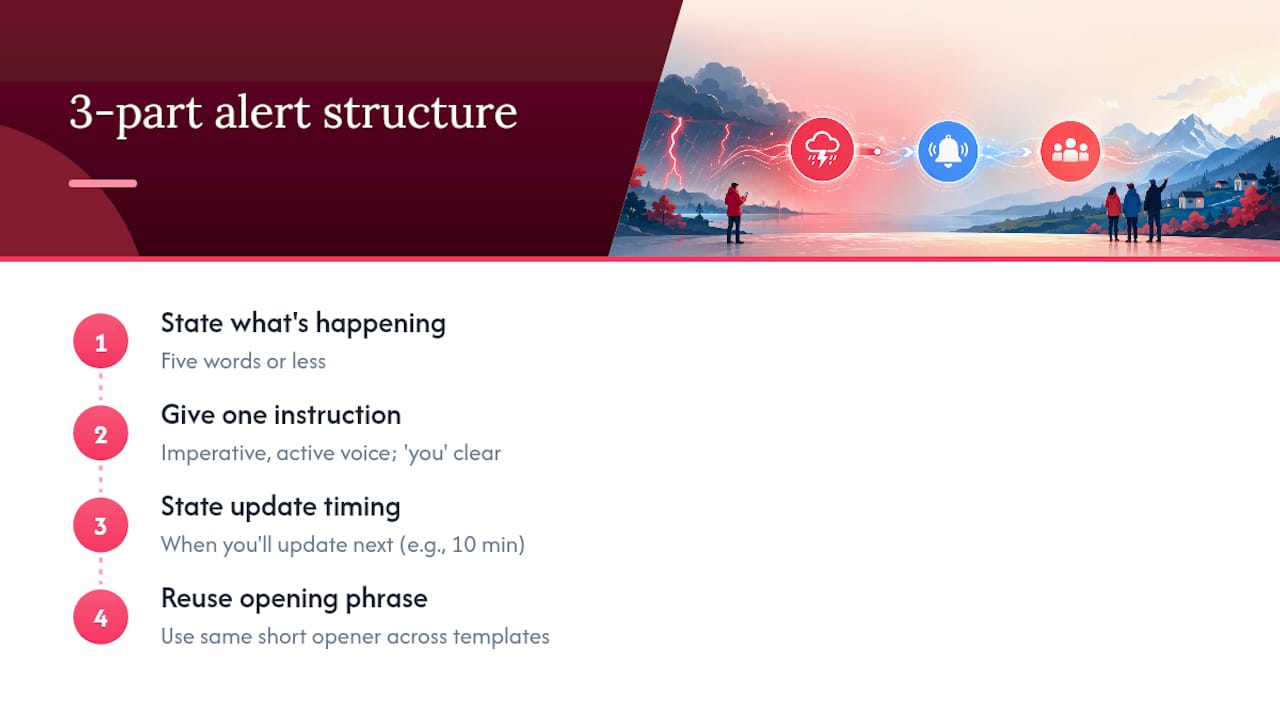
The three-part structure exists because people under stress can’t process more than one instruction at a time. State what’s happening in five words or less. Give one instruction. State when you’ll update again. That’s it.
Skip the meteorology. “A line of severe thunderstorms is tracking east at 35 miles per hour” tells your guest nothing they can act on. “Storm approaching. Move to Hall B now” tells them everything. Emergency alert guidance from Omnilert recommends this exact trade: drop the weather-service detail, keep the instruction.
Active voice matters more than most planners realize. “Attendees should proceed to shelter” is passive and vague about who’s responsible for what. “Move to the pavilion now” is a command. Compliance improves when the verb comes first and the subject is unmistakably “you.”
Here’s a real before-and-after:
Original: “Due to an approaching weather system with potential for high winds and lightning, we are asking all attendees in the outdoor seating areas to please consider making their way toward the main building at their earliest convenience.”
Revised: “Lightning approaching. Move to Main Building now. Next update at [time].”
Crisis communication works best when every message follows the same three-part rhythm every time, because familiarity is what lets a stressed reader act on five words instead of fifty.
Pro Tip: Reuse the same opening phrase across your templates (“Storm approaching,” “All clear”) so recognition kicks in before your attendee even finishes reading the sentence.
When Should You Send the First Alert and How Often After?
Timing decisions come down to three trigger categories, and each one has a different opening move.
-
Pre-notify (hours to a day out): send a heads-up email or text the morning of the event so attendees pack accordingly. Pre-notification measurably speeds response time later when the real alert arrives.
-
Precautionary window (30 to 60 minutes out): send an advisory text, brief staff by radio, and stage your shelter locations.
-
Imminent threat: send the approved action alert through every channel in the incident plan, following the direction of venue and emergency officials.
Once you’re in a static situation, use the cadence in your venue’s incident plan and any instructions from emergency officials. Tell attendees when the next update will arrive, even if conditions have not changed. Clear, transparent updates can reduce uncertainty and support informed action. Use a message such as “No change; next update at [time]” when that matches the incident plan.
| Trigger | Timing | First action |
|---|---|---|
| Pre-notify | Morning of event | Email or text advisory |
| Precautionary | 30 to 60 min before impact | SMS + staff radio briefing |
| Imminent threat | Immediate | Approved alert through planned channels |
| Static situation | Ongoing | Follow the incident plan and name the next update time |
The on-duty communications coordinator’s checklist should include confirming who has channel access, verifying the shelter location text matches what’s posted on-site, and logging the exact minute each alert went out.
How Do You Deploy Alerts Across Every Channel at Once?
Don’t rely on SMS by itself. Some attendees have their phones silenced, some are far from a speaker, and some never opted into texts at all. Redundant deployment across PA, digital signage, push notifications, and staff radios closes the gaps any single channel leaves open.
-
SMS: a direct and fast individual channel, but delivery depends on the carrier, network, device, signal, and phone numbers collected in advance.
-
PA announcements: reach everyone in earshot instantly, but useless in loud outdoor zones or spread-out venues.
-
Digital signage: reinforces the message visually for anyone who missed the audio.
-
Push notifications: work well if attendees have your event app installed, but adoption is never universal.
-
Staff radios: keep your crew coordinated even if public channels go down.
| Role | Owns | Responsibility |
|---|---|---|
| Communications coordinator | SMS + overall approval | Sends the text, confirms wording matches PA script |
| Stage manager | PA + on-site direction | Announces verbally, directs crowd flow |
| Video operator | Digital signage | Pushes the same message to on-screen displays |
Your redundancy plan needs a clear primary and backup for every channel. If your PA system fails, the stage manager should have a bullhorn as backup. If SMS delivery lags, staff radios carry the instruction verbally until texts land. Run through this checklist before doors open:
-
Confirm the coordinator can access today’s approved templates and guest groups.
-
Test PA system audio reaches every zone, not just the front.
-
Verify digital signage is connected and displaying correctly.
-
Confirm all staff have working radios on the correct channel.
What Should You Do Before Event Day?
None of this works if you haven’t collected phone numbers, tested your channels, and drilled your staff beforehand. Two to three communication methods should be selected and tested for each phase of your event, not assembled the morning something goes wrong.
Start with opt-in collection. Whether it’s a ticketing form field or an on-site sign-up table, record consent clearly and import that list into your messaging platform weeks before the event, not the night before.
Run a real test plan. Send a dummy alert to a small staff group and ask recipients to confirm receipt. Walk the venue and verify PA coverage reaches every corner, not just the main tent. Drill your team on who approves a message before it goes out, because a small, designated communications authority prevents conflicting information from different staff members during an actual incident.
| Pre-event step | What to verify |
|---|---|
| Opt-in collection | Consent recorded, numbers imported into platform |
| Channel test | PA, signage, SMS, and app push all confirmed working |
| Staff drill | Everyone knows their channel, their role, and the approval chain |
| Contingency plan | Backup method assigned for every channel that could fail |
Pro Tip: Run your test alert at the exact time of day you’d expect a real one, since PA coverage and phone signal both behave differently during a packed afternoon than during setup at 7 AM.
Setting Up Weather Alerts in TextMyGuests
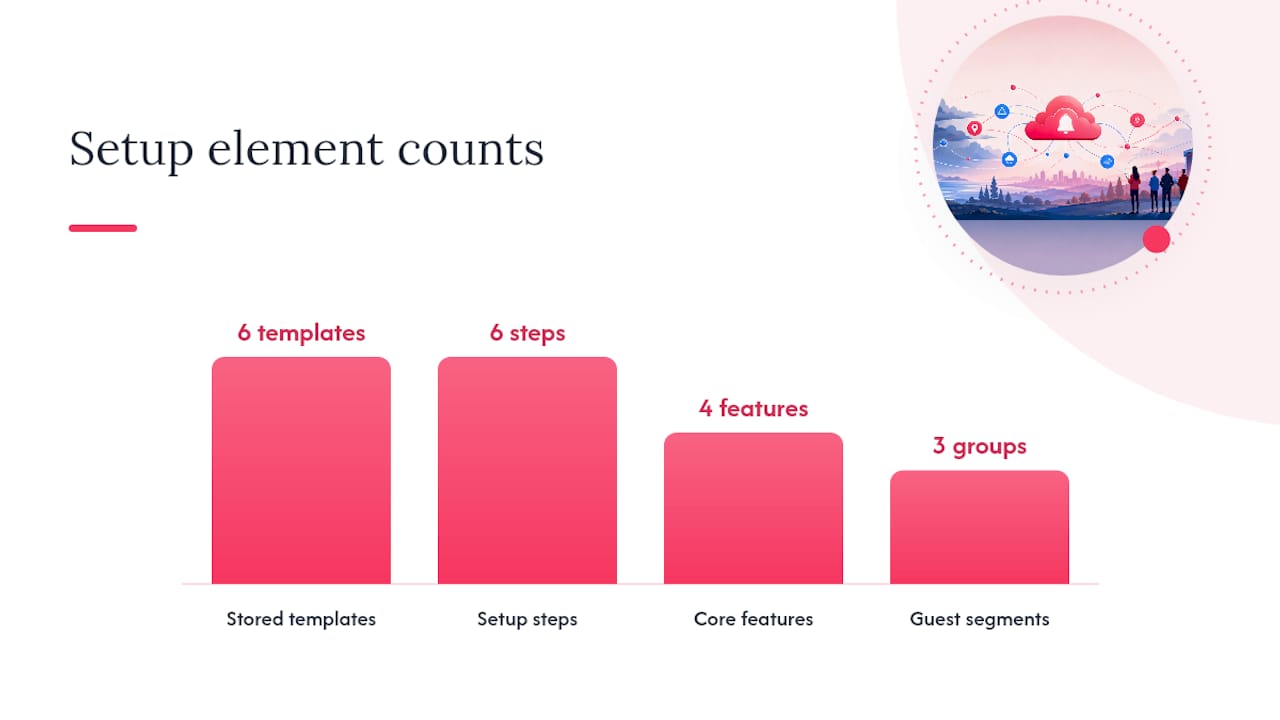
TextMyGuests gives event organizers the pieces this whole workflow depends on: scheduled messages, one-to-many broadcasts, segmented guest lists, and a single stream where every reply lands so nothing gets lost across group texts.
-
Import your guest list before event day, split into staff, vendors, and attendees so each group gets the right level of detail.
-
Keep your six approved templates in the team emergency plan (pre-notify, precautionary, action, delay, cancellation, all-clear), then copy the approved wording into a message during an incident.
-
Assign co-host access to your stage manager or second-in-command so more than one person can trigger an alert if you’re unreachable.
-
Test the workflow by sending a dummy pre-notify message to a staff segment and asking recipients to confirm receipt.
-
Log every message sent during the event itself, since a clean record makes your after-action review far easier.
| Feature | Use case |
|---|---|
| Scheduled messages | Send pre-notify alerts automatically the morning of the event |
| Segmented lists | Separate staff, vendor, and attendee messaging |
| Broadcast + reply stream | Send action alerts and collect guest replies in one place |
| Co-host access | Backup sender if primary coordinator is occupied |
Where your venue has PA or digital signage capability, trigger the channels specified by the emergency plan. SMS can reach phones directly, while PA, signage, and trained staff remain essential fallbacks and reinforcements.
What I’ve Learned From Watching Events Handle Weather Badly
The single biggest mistake I see isn’t a late first alert. It’s a late all-clear. Organizers get so focused on the crisis moment that once the storm passes, the “resume” message lags 15, 20 minutes behind reality, and attendees left standing under a dripping tent start making their own decisions about whether it’s safe to move.
Fix that by treating the all-clear with the same urgency as the warning itself. When the authorized venue or emergency lead confirms it is safe, send the approved all-clear through the planned channels. Continue updates at the cadence set by the venue’s plan and emergency officials, even when there is no material change. State the next update time so attendees know when to expect more information.
Get Your Weather Alert Workflow Running Before Your Next Event
TextMyGuests gives you scheduled messages, instant one-to-many broadcasts, guest groups, a dedicated event phone number, co-host access, and an organized reply stream. Keep approved emergency templates in your team’s incident plan, then use TextMyGuests to reach the appropriate guest groups and monitor replies without relying on a personal phone or scattered group chats.

Set up a one-event activation, import your attendee list, and send a pre-notify test message before your event goes live. Ask your small staff test group to confirm receipt, check that your staff segment received its version, and you’ll walk into event day with a workflow you’ve already exercised. Start that setup at TextMyGuests.
Frequently Asked Questions
How long should a weather alert text be? Keep it concise, then check the final copy for encoding and segment count. A single GSM-7 segment supports up to 160 characters, while Unicode/UCS-2 is typically 70; concatenated messages commonly use 153 or 67 characters per segment. Smart punctuation and other characters may change the encoding.
Should I rely on SMS as my only weather alert channel? No. Trigger SMS alongside at least one on-site channel, like PA or digital signage, since phone silence, dead zones, and low signal all break single-channel delivery.
How often should I send updates during an ongoing weather event? Use the cadence in your venue’s incident plan and follow instructions from emergency officials. Tell attendees when the next update will arrive, and change the cadence when the authorized incident lead directs it.
What’s the biggest mistake organizers make with weather alerts? Delaying the all-clear message. Send it promptly after the authorized venue or emergency lead confirms it is safe, since a slow all-clear can extend uncertainty after the danger has passed.
Sources
For deeper operational checklists on multi-channel readiness and pre-event testing, start with the NWS Event Ready guide, which covers method selection across every phase of an event. From there, these sources cover the specific pieces this article draws from:
-
Weather warning/watch/advisory language and jargon (Poynter)
-
Crafting effective crisis communications in event venues (Joffee Emergency Services)
-
Event crisis communication plan: a practical guide (Event Planner Expo)